
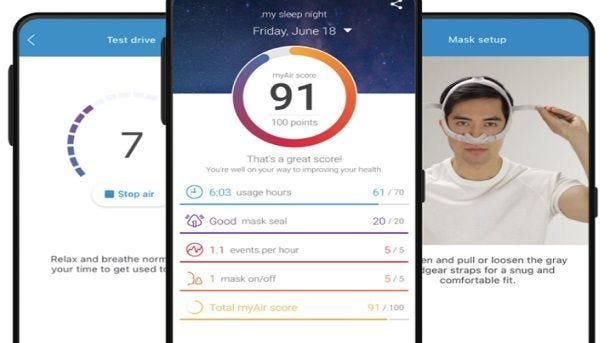
Explaining ResMed MyAir™ App
This post was originally posted on November 17, 2021, and updated on February 16, 2022.
An interactive and informative app now puts you in touch with your ResMed CPAP machine. From troubleshooting CPAP issues to capturing sleep data, this handy app gives you insight and also engagement into customized sleep therapy.
What is ResMed MyAir?
MyAir is a personalized therapy management platform for patients using ResMed AirSense or AirCurve CPAP machines. The app equips therapy users with information useful in resolving basic therapy issues to help improve compliance and increase comfort. MyAir empowers CPAP users to take an active role in therapy by utilizing education and troubleshooting tools, also helping people feel confident and motivated to stay in therapy.
“MyAir is personalized to each individual patient’s therapy journey–they can see important information about their sleep therapy, make adjustments to improve the treatment experience, and share their progress with family members and loved ones, all on a daily basis,” said Raj Sodhi, Vice President, ResMed Healthcare Informatics. “If and when issues arise patients receive the information, they need through MyAir, allowing HMEs to focus on other patients more in need of support.”
How Does the ResMed MyAir Work?
CPAP therapy users can access MyAir from their mobile phones and tablets, anytime, anywhere. The app is designed exclusively for ResMed’s AirSense and AirCurve devices which are wirelessly enabled to automatically deliver therapy data into the application on a daily basis.
Once the machine is purchased and the details are loaded into the MyAir system by your device supplier, you will receive an email to create a ResMed MyAir account. Once the account is created and you begin to use the CPAP machine, it will automatically wirelessly connect and upload your data.
Get Timely Cleaning and Inspection Reminders on ResMed MyAir
MyAir has taken a step towards spreading the word about the importance of cleaning in an effort to achieve CPAP compliance. Patients can enable the monthly reminders on MyAir for cleaning. Cleaning a CPAP daily improves CPAP compliance and promotes a healthier CPAP experience. Along with timely reminders, ResMed MyAir also provides tips to help users clean their therapy equipment.
- Time triggered coaching messages
- Notifications through either email or text
- These notifications can be turned on and off, independent of other coaching messages
ResMed MyAir’s Dashboard Helps Track Sleep Therapy Progress
Program your personalized program to:
- Receive automated, personalized coaching and support
- Build your confidence by using your therapy
- Get more support here: https://myair.resmed.com/Support.aspx
How Accurate is the ResMed MyAir Mobile App?
The ResMed MyAir app uses factors such as usage hours, mask seal, and events per night as guidelines for determining a sleep score. The accuracy of the app is based on these guidelines. The goal is to provide a frame of reference for CPAP therapy to help patients stay compliant. By following these guidelines most patients can improve sleep and minimize sleep apnea events. Using a score-based model also gives patients the incentive to improve sleep apnea therapy.
ResMed MyAir Score
This is a completely free service for The CPAP Shop's customers courtesy of ResMed. MyAir users receive a MyAir score each morning calculated from their therapy data, providing them with a quick, snapshot view of their treatment. They can also click through to see how their MyAir score was calculated from metrics such as usage time and mask seal. This online platform makes it easier for patients to track their sleep progress which can help them feel more confident and encouraged night after night.
Frequently Asked Questions on ResMed MyAir
How Much Does MyAir Cost?
MyAir is absolutely free of cost. This service is provided by ResMed to help sleep apnea patients. You can download it on your android device, IOS device, or also your desktop or laptop at home.
Deviating from the trend of paid subscription-based services, ResMed offers its MyAir services without any paid subscription. Just download it on your device and connect it with any CPAP machine compatible with this application.
What is a Good MyAir Score?
MyAir uses a nightly MyAir Score which helps measure the quality of sleep received. The MyAir score has a range of 0-100 depending on the number of hours used, mask seal, events per hour, and the number of times the mask was taken off. A MyAir score higher than 70 is a good score.
Along with the MyAir Score, this platform also offers tailored coaching, timely cleaning reminders, and educational information. Patients can easily navigate within the platform. Some other features include:
- Automatic data synchronization
- No need for pairing with Bluetooth®
- Hassle-free modules
Does ResMed MyAir Have a Web Application?
There is a ResMed MyAir web application available if you want to use the app on your laptop or desktop computer. The phone-based app is the most popular as it puts all your critical sleep data in the palm of your hand. And you can access it even while away from home.
How Does MyAir Calculate My Score?
Hours Used
One of the ways MyAir calculates your score is by how many hours you use your CPAP machine. Regular nightly use ensures compliance. Usage hours account for about 70% of the final score. Since this factor accounts for the majority of your sleep score, it’s the most important to consider.
Mask Seal
The quality of your mask seal affects overall CPAP performance. The mask seal accounts for 10% of your MyAir score. If your mask leaks or is poorly fitting, then you will get a lower number for this score. Make sure the mask fits securely and that it doesn’t have leaks. You can always replace a mask with a poor seal.
Events Per Hour (AHI)
MyAir evaluates the number of apneas you experience every hour as you sleep. The higher the number, the lower the score. Events Per Hour accounts for 10% of the score. If you continue to have frequent apnea events, then you need to speak to your doctor to make adjustments to your CPAP therapy.
Mask Removal
How frequently you remove your mask at night affects your overall CPAP therapy. This number accounts for 10% of your score. The more often you take off your mask the less effective CPAP therapy becomes. Try to wear your mask consistently throughout the night to stay CPAP compliant.
Best ResMed CPAP Machines with ResMed MyAir Feature
The ResMed MyAir app is available for the following CPAP machines:
- ResMed AirSense 10 CPAP Machine with Humidifier
- ResMed AirSense 10 Elite CPAP Machine with Heated Humidifier
- ResMed AirCurve 10 VAuto
- ResMed AirCurve 10 ST with Heated Humidifier
- ResMed AirCurve ™ 10 ASV with Heated Humidifier
- ResMed AirCurve™ 10 S with Heated Humidifier
Contact The CPAP Shop for more information by calling 866-414-9700 or by emailing questions@thecpapshop.com.